Zdenduino - Final form of Dashboard - Part 6
Yesterday I couldn’t stop thinking how to move forward with ESP32C3 and especially that the test case #4 from my last post was kinda sorta not enough (built in a rush with a hot needle). I knew I could do more.
So I sat down and after a lot of deliberation of why the ** I cant upload an image to ESP32, I decided it is time to split the project properly and make dedicated backend and frontend parts instead of forcing everything into a single cramped chunk.
Moving Beyond the Arduino IDE
This decision made my life SO MUCH EASIER I can’t believe it. It also helped, well, I was kinda forced to use VS Code (with PlatformIO) instead of the stock ArduinoIDE for this particular “test”. For it to run smoothly, I used this initialization:
1
2
3
4
5
6
7
8
9
10
11
12
13
14
15
16
17
18
19
20
; PlatformIO Project Configuration File
;
;   Build options: build flags, source filter
;   Upload options: custom upload port, speed and extra flags
;   Library options: dependencies, extra library storages
;   Advanced options: extra scripting
;
; Please visit documentation for the other options and examples
; [https://docs.platformio.org/page/projectconf.html](https://docs.platformio.org/page/projectconf.html)

[env:esp32-c3-devkitm-1]
platform = espressif32
board = esp32-c3-devkitm-1
framework = arduino
monitor_speed = 115200

; Automatical download of libraries needed
lib_deps =
    links2004/WebSockets @ ^2.4.1
    bblanchon/ArduinoJson @ ^7.0.4
And the core micro-controller firmware is now much, much shorter because of all the heavy javascript/html layouts being in a file of its own running locally on my client side.
Full C++ code for Dashboard backend
1
2
3
4
5
6
7
8
9
10
11
12
13
14
15
16
17
18
19
20
21
22
23
24
25
26
27
28
29
30
31
32
33
34
35
36
37
38
39
40
41
42
43
44
45
46
47
48
49
50
51
52
53
54
55
56
57
58
59
60
61
62
63
64
65
66
67
68
69
70
71
72
73
74
75
76
77
78
79
80
81
82
83
84
85
86
87
88
89
90
91
92
93
94
95
96
97
98
99
100
101
102
103
104
105
106
107
108
109
110
111
112
113
114
115
116
117
118
119
120
121
122
123
124
125
126
127
128
129
130
131
132
133
134
135
136
137
138
139
140
141
142
143
144
145
146
147
148
149
150
151
152
153
154
155
156
157
158
159
160
161
162
163
164
165
166
167
168
169
170
171
172
173
174
175
176
177
178
179
180
181
182
183
184
185
186
187
188
189
190
191
192
#include <WiFi.h>
#include <WebSocketsServer.h>
#include <ArduinoJson.h>

const char* ssid = "YOUR-WIFI-SSID";
const char* password = "YOUR-WIFI-PASSWORD";

WebSocketsServer webSocket = WebSocketsServer(81);

unsigned long lastTelemetryTime = 0;
const unsigned long telemetryInterval = 500; // Made faster to 500ms for immediate PIN response

struct GpioConfig {
  int pin;
  bool hasPwm;
};

GpioConfig gpioList[] = {
  {4, true},
  {5, true},
  {6, true},
  {7, true},
  {9, true},
  {10, false},
  {3, false}
};

// Help structure to monitor events inside ESP
struct GpioState {
  String mode = "input"; // input, output, pwm
};
GpioState gpioStates[12]; // Indexed directly by GPIO numbers

void notifyClients(String message) {
  webSocket.broadcastTXT(message);
}

void sendTelemetry() {
  JsonDocument doc;
  doc["type"] = "telemetry";
  doc["uptime"] = millis() / 1000;
  doc["rssi"] = WiFi.RSSI();

  JsonObject pins = doc["pins"].to<JsonObject>();
  JsonObject modes = doc["modes"].to<JsonObject>();

  for(auto &g : gpioList) {
    pins[String(g.pin)] = digitalRead(g.pin);
    modes[String(g.pin)] = gpioStates[g.pin].mode;
  }

  String output;
  serializeJson(doc, output);
  notifyClients(output);
}

void handleWebSocketMessage(uint8_t *payload, size_t length) {
  JsonDocument doc;
  DeserializationError error = deserializeJson(doc, payload, length);
  if (error) return;

  String type = doc["type"];

  // Heartbeat (Ping from client)
  if (type == "ping") {
    JsonDocument pongDoc;
    pongDoc["type"] = "pong";
    String pongPayload;
    serializeJson(pongDoc, pongPayload);
    notifyClients(pongPayload);
    return;
  }

  int pin = doc["pin"];

  if(type == "digital") {
    int value = doc["value"];
    digitalWrite(pin, value);

    JsonDocument resp;
    resp["type"] = "log";
    resp["message"] = "GPIO" + String(pin) + " set to " + (value ? "HIGH (Log1)" : "LOW (Log0)");
    String output;
    serializeJson(resp, output);
    notifyClients(output);
  }

  if(type == "pwm") {
    int value = doc["value"];
    analogWrite(pin, value);

    JsonDocument resp;
    resp["type"] = "log";
    resp["message"] = "GPIO" + String(pin) + " PWM -> " + String(value);
    String output;
    serializeJson(resp, output);
    notifyClients(output);
  }

  if(type == "mode") {
    String mode = doc["mode"];
    gpioStates[pin].mode = mode; // Save current data

    if(mode == "input") {
      ledcDetachPin(pin);
      pinMode(pin, INPUT);
    }
    else if(mode == "output") {
      ledcDetachPin(pin);
      pinMode(pin, OUTPUT);
      digitalWrite(pin, LOW);
    }
    else if(mode == "pwm") {
      ledcSetup(pin, 5000, 8);
      ledcAttachPin(pin, pin);
    }

    String modeUpper = mode;
    modeUpper.toUpperCase();

    JsonDocument resp;
    resp["type"] = "log";
    resp["message"] = "GPIO" + String(pin) + " configured as " + modeUpper;
    String output;
    serializeJson(resp, output);
    notifyClients(output);
  }
}

void webSocketEvent(uint8_t num, WStype_t type, uint8_t * payload, size_t length) {
  switch(type) {
    case WStype_DISCONNECTED:
      Serial.printf("[%u] Disconnected!\n", num);
      break;
    case WStype_CONNECTED: {
      Serial.printf("[%u] Connected!\n", num);
      JsonDocument resp;
      resp["type"] = "log";
      resp["message"] = "Zdenduino backend connection established.";
      String output;
      serializeJson(resp, output);
      webSocket.sendTXT(num, output);
      sendTelemetry(); // Immediate synchronization of data from newly connected client
      break;
    }
    case WStype_TEXT:
      handleWebSocketMessage(payload, length);
      break;
    default:
      break;
  }
}

void setup() {
  Serial.begin(115200);

  // Initial initialization of internal state of the board
  for(auto &g : gpioList) {
    pinMode(g.pin, INPUT); // Setup everything to safe value
    gpioStates[g.pin].mode = "input";
  }

  WiFi.begin(ssid, password);
  Serial.println();
  Serial.print("Connecting to WiFi");
  while(WiFi.status() != WL_CONNECTED) {
    delay(500);
    Serial.print(".");
  }

  Serial.println("\n========================================");
  Serial.println(" WiFi Connected successfully!");
  Serial.print(" ESP32 IP: ");
  Serial.println(WiFi.localIP());
  Serial.println(" WebSockets port: 81");
  Serial.println("========================================");

  webSocket.begin();
  webSocket.onEvent(webSocketEvent);
}

void loop() {
  webSocket.loop();

  unsigned long currentMillis = millis();
  if (currentMillis - lastTelemetryTime >= telemetryInterval) {
    lastTelemetryTime = currentMillis;
    if (WiFi.status() == WL_CONNECTED) {
      sendTelemetry();
    }
  }
}
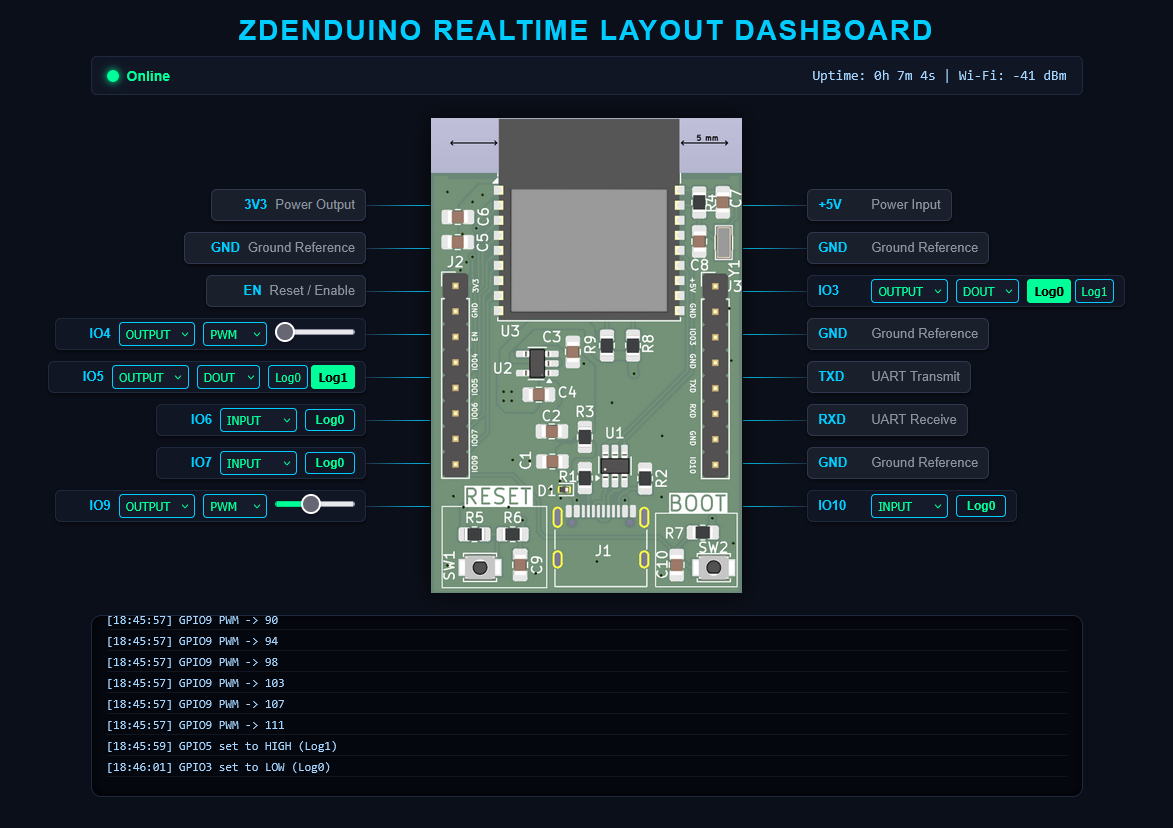
And the frontend now looks like this:
Full Javacript/HTML code for Dashboard frontend
1
2
3
4
5
6
7
8
9
10
11
12
13
14
15
16
17
18
19
20
21
22
23
24
25
26
27
28
29
30
31
32
33
34
35
36
37
38
39
40
41
42
43
44
45
46
47
48
49
50
51
52
53
54
55
56
57
58
59
60
61
62
63
64
65
66
67
68
69
70
71
72
73
74
75
76
77
78
79
80
81
82
83
84
85
86
87
88
89
90
91
92
93
94
95
96
97
98
99
100
101
102
103
104
105
106
107
108
109
110
111
112
113
114
115
116
117
118
119
120
121
122
123
124
125
126
127
128
129
130
131
132
133
134
135
136
137
138
139
140
141
142
143
144
145
146
147
148
149
150
151
152
153
154
155
156
157
158
159
160
161
162
163
164
165
166
167
168
169
170
171
172
173
174
175
176
177
178
179
180
181
182
183
184
185
186
187
188
189
190
191
192
193
194
195
196
197
198
199
200
201
202
203
204
205
206
207
208
209
210
211
212
213
214
215
216
217
218
219
220
221
222
223
224
225
226
227
228
229
230
231
232
233
234
235
236
237
238
239
240
241
242
243
244
245
246
247
248
249
250
251
252
253
254
255
256
257
258
259
260
261
262
263
264
265
266
267
268
269
270
271
272
273
274
275
276
277
278
279
280
281
282
283
284
285
286
287
288
289
290
291
292
293
294
295
296
297
298
299
300
301
302
303
304
305
306
307
308
309
310
311
312
313
314
315
316
317
318
319
320
321
322
323
324
325
326
327
328
329
330
331
<!DOCTYPE html>
<html lang="en">
<head>
<meta charset="UTF-8">
<meta name="viewport" content="width=device-width, initial-scale=1.0">
<title>Zdenduino Remote Dashboard</title>
<style>
body { margin: 0; background: #0b0f19; color: #00ff99; font-family: Arial, sans-serif; padding-bottom: 50px; }
h1 { text-align: center; margin-top: 20px; color: #00ccff; font-size: 28px; text-transform: uppercase; letter-spacing: 2px; margin-bottom: 5px; }

/* Status Bar for errors and telemetry data */
.status-bar { width: 960px; margin: 10px auto; background: #111625; border: 1px solid #1f293d; border-radius: 6px; padding: 10px 15px; display: flex; justify-content: space-between; align-items: center; font-size: 14px; }
.status-indicator { display: flex; align-items: center; gap: 8px; font-weight: bold; }
.status-dot { width: 12px; height: 12px; border-radius: 50%; background: #ff3333; display: inline-block; box-shadow: 0 0 8px #ff3333; }
.status-dot.connected { background: #00ff99; box-shadow: 0 0 8px #00ff99; }
.telemetry-data { color: #a5d6ff; font-family: monospace; }

/* Main app container with explicit spacing around the PCB image */
.container {
  display: flex;
  justify-content: center;
  align-items: center;
  gap: 0px;
  margin: 20px auto;
  width: 1200px; /* Widened to support layout expansion */
  position: relative;
}

/* Added explicit margins to push control boxes further out from the PCB edge */
.pin-column { display: flex; flex-direction: column; gap: 11px; width: 390px; }
#left-column { text-align: right; align-items: flex-end; margin-right: 65px; }
#right-column { text-align: left; align-items: flex-start; margin-left: 65px; }

/* Pin row layout */
.pin-row { position: relative; background: #111625; border: 1px solid #1f293d; border-radius: 6px; padding: 4px 10px; display: flex; align-items: center; gap: 8px; height: 32px; font-size: 13px; box-shadow: 0 2px 4px rgba(0,0,0,0.5); box-sizing: border-box; }
.pin-row.static { background: #1a1f2c; color: #8b949e; border-color: #2f364d; }
.pin-label { font-weight: bold; color: #00ccff; min-width: 45px; }

/* Connection lines - length extended to 65px to cleanly bridge the gap */
.pin-row::after { content: ''; position: absolute; top: 50%; width: 65px; height: 1px; }
#left-column .pin-row::after { right: -65px; background: linear-gradient(90deg, #1f293d, #00ccff); }
#right-column .pin-row::after { left: -65px; background: linear-gradient(270deg, #1f293d, #00ccff); }

select, button { background: #161b2c; color: #00ff99; border: 1px solid #00ccff; border-radius: 4px; padding: 2px 6px; font-size: 12px; cursor: pointer; height: 24px; }
button.active { background: #00ff99; color: #000; font-weight: bold; border-color: #00ff99; }
input[type=range] { width: 80px; accent-color: #00ff99; margin: 0; }

/* Logic Input Status Lamps matching hardware telemetry */
.logic-lamp { display: inline-flex; align-items: center; justify-content: center; font-size: 12px; font-weight: bold; border-radius: 4px; padding: 2px 8px; height: 22px; box-sizing: border-box; min-width: 50px; }
.logic-lamp.log0 { background: #111625; color: #00ff99; border: 1px solid #00ccff; }
.logic-lamp.log1 { background: #00ff99; color: #000000; border: 1px solid #00ff99; font-weight: bold; box-shadow: 0 0 6px rgba(0,255,153,0.4); }

/* Center board element setup */
.board-image {
  width: 320px;
  height: 480px;
  background-image: url('zdenduino_pcb.png');
  background-size: contain;
  background-repeat: no-repeat;
  background-position: center;
  z-index: 2;
  filter: drop-shadow(0 0 10px rgba(0,0,0,0.7));
}

/* Connection dropout security layer */
.connection-error-overlay { display: flex; position: absolute; top: 0; left: 0; width: 100%; height: 100%; background: rgba(11, 15, 25, 0.85); z-index: 10; justify-content: center; align-items: center; border-radius: 10px; border: 2px solid #ff3333; backdrop-filter: blur(4px); }
.error-box { text-align: center; background: #1a131d; padding: 30px; border-radius: 8px; border: 1px solid #ff3333; box-shadow: 0 0 20px rgba(255,51,51,0.3); }
.error-box h2 { color: #ff3333; margin: 0 0 10px 0; font-size: 22px; text-transform: uppercase; }
.error-box p { color: #ffffff; margin: 0; font-size: 14px; }

.console { width: 960px; margin: auto; background: #05070f; border: 1px solid #1f293d; border-radius: 10px; padding: 15px; height: 150px; overflow-y: auto; font-family: monospace; font-size: 12px; box-shadow: inset 0 0 10px rgba(0,0,0,0.8); }
.log { color: #a5d6ff; margin-bottom: 4px; border-bottom: 1px solid #101520; padding-bottom: 2px; }
</style>
</head>
<body>

<h1>Zdenduino Realtime Layout Dashboard</h1>

<div class="status-bar">
  <div class="status-indicator">
    <span class="status-dot" id="status-dot"></span>
    <span id="status-text">Disconnected from HW</span>
  </div>
  <div class="telemetry-data">
    Uptime: <span id="telemetry-uptime">0s</span> | Wi-Fi: <span id="telemetry-rssi">0 dBm</span>
  </div>
</div>

<div class="container">
  <div class="connection-error-overlay" id="error-overlay">
    <div class="error-box">
      <h2>ESP32 Communication Error</h2>
      <p>Connection lost. Attempting to reconnect...</p>
    </div>
  </div>

  <div class="pin-column" id="left-column">
    <div class="pin-row static"><span class="pin-label">3V3</span><span>Power Output</span></div>
    <div class="pin-row static"><span class="pin-label">GND</span><span>Ground Reference</span></div>
    <div class="pin-row static"><span class="pin-label">EN</span><span>Reset / Enable</span></div>
    <div id="pin-container-4"></div>
    <div id="pin-container-5"></div>
    <div id="pin-container-6"></div>
    <div id="pin-container-7"></div>
    <div id="pin-container-9"></div>
  </div>

  <div class="board-image"></div>

  <div class="pin-column" id="right-column">
    <div class="pin-row static"><span class="pin-label">+5V</span><span>Power Input</span></div>
    <div class="pin-row static"><span class="pin-label">GND</span><span>Ground Reference</span></div>
    <div id="pin-container-3"></div>
    <div class="pin-row static"><span class="pin-label">GND</span><span>Ground Reference</span></div>
    <div class="pin-row static"><span class="pin-label">TXD</span><span>UART Transmit</span></div>
    <div class="pin-row static"><span class="pin-label">RXD</span><span>UART Receive</span></div>
    <div class="pin-row static"><span class="pin-label">GND</span><span>Ground Reference</span></div>
    <div id="pin-container-10"></div>
  </div>
</div>

<div class="console" id="console"></div>

<script>
const ESP32_IP = "192.168.XXX.XXX"; // Enter you ESP32 IP
let ws;
let pingInterval;
let reconnectTimeout;

const pinsConfig = {
  4: { pwm: true },
  5: { pwm: true },
  6: { pwm: true },
  7: { pwm: true },
  9: { pwm: true },
  10: { pwm: false },
  3: { pwm: false }
};

Object.keys(pinsConfig).forEach(pin => {
  const container = document.getElementById(`pin-container-${pin}`);
  if (!container) return;
  container.className = 'pin-row';
  container.innerHTML = `
    <span class="pin-label">IO${pin}</span>
    <select id="mode-${pin}" onchange="updatePinMode(${pin}, this.value)">
      <option value="input">INPUT</option>
      <option value="output">OUTPUT</option>
    </select>
    <span id="input-container-${pin}" style="display:inline-block;">
      <span id="lamp-${pin}" class="logic-lamp log0">Log0</span>
    </span>
    <span id="out-type-container-${pin}" style="display:none;">
      <select id="out-type-${pin}" onchange="updateOutType(${pin}, this.value)">
        <option value="dout">DOUT</option>
        ${pinsConfig[pin].pwm ? '<option value="pwm">PWM</option>' : ''}
      </select>
    </span>
    <span id="dout-container-${pin}" style="display:none;">
      <button id="btn-low-${pin}" onclick="setDigital(${pin}, 0)">Log0</button>
      <button id="btn-high-${pin}" onclick="setDigital(${pin}, 1)">Log1</button>
    </span>
    <span id="pwm-container-${pin}" style="display:none;">
      <input type="range" id="slider-${pin}" min="0" max="255" value="0" oninput="sendPWM(${pin}, this.value)">
    </span>
  `;
});

function connect() {
  log(`Connecting to ws://${ESP32_IP}:81...`);
  ws = new WebSocket(`ws://${ESP32_IP}:81`);

  ws.onopen = () => {
    log("Connected to hardware backend.");
    document.getElementById("status-dot").className = "status-dot connected";
    document.getElementById("status-text").textContent = "Online";
    document.getElementById("error-overlay").style.display = "none";
    clearTimeout(reconnectTimeout);

    send({type: 'requestSync'});

    pingInterval = setInterval(() => {
      if(ws.readyState === WebSocket.OPEN) {
        send({type: 'ping'});
      }
    }, 5000);
  };

  ws.onmessage = (event) => {
    try {
      const data = JSON.parse(event.data);

      if (data.type === "telemetry") {
        const sec = data.uptime % 60;
        const min = Math.floor((data.uptime / 60) % 60);
        const hod = Math.floor(data.uptime / 3600);
        document.getElementById("telemetry-uptime").textContent = `${hod}h ${min}m ${sec}s`;
        document.getElementById("telemetry-rssi").textContent = `${data.rssi} dBm`;

        if (data.pins && data.modes) {
          Object.keys(data.pins).forEach(pin => {
            const state = data.pins[pin];
            const currentMode = data.modes[pin];

            const lamp = document.getElementById(`lamp-${pin}`);
            if (lamp) {
              if (state === 1) {
                lamp.className = "logic-lamp log1";
                lamp.textContent = "Log1";
              } else {
                lamp.className = "logic-lamp log0";
                lamp.textContent = "Log0";
              }
            }

            const modeSelect = document.getElementById(`mode-${pin}`);
            if(modeSelect && modeSelect.value !== currentMode && !modeSelect.dataset.userInteracting) {
               applyUiStateForMode(pin, currentMode);
            }
          });
        }
      }
      else if (data.type === "log") {
        log(data.message);
      }
    } catch(e) { }
  };

  ws.onclose = () => { handleDisconnect(); };
  ws.onerror = (err) => { ws.close(); };
}

function applyUiStateForMode(pin, mode) {
  const modeSelect = document.getElementById(`mode-${pin}`);
  const inputContainer = document.getElementById(`input-container-${pin}`);
  const outTypeContainer = document.getElementById(`out-type-container-${pin}`);
  const doutContainer = document.getElementById(`dout-container-${pin}`);
  const pwmContainer = document.getElementById(`pwm-container-${pin}`);

  if(modeSelect) modeSelect.value = (mode === 'pwm') ? 'output' : mode;

  if (mode === 'input') {
    if(inputContainer) inputContainer.style.display = 'inline-block';
    if(outTypeContainer) outTypeContainer.style.display = 'none';
    if(doutContainer) doutContainer.style.display = 'none';
    if(pwmContainer) pwmContainer.style.display = 'none';
  } else if (mode === 'output') {
    if(inputContainer) inputContainer.style.display = 'none';
    if(outTypeContainer) outTypeContainer.style.display = 'inline-block';
    document.getElementById(`out-type-${pin}`).value = 'dout';
    if(doutContainer) doutContainer.style.display = 'inline-block';
    if(pwmContainer) pwmContainer.style.display = 'none';
  } else if (mode === 'pwm') {
    if(inputContainer) inputContainer.style.display = 'none';
    if(outTypeContainer) outTypeContainer.style.display = 'inline-block';
    document.getElementById(`out-type-${pin}`).value = 'pwm';
    if(doutContainer) doutContainer.style.display = 'none';
    if(pwmContainer) pwmContainer.style.display = 'inline-block';
  }
}

function handleDisconnect() {
  clearInterval(pingInterval);
  document.getElementById("status-dot").className = "status-dot";
  document.getElementById("status-text").textContent = "Connection Error!";
  document.getElementById("error-overlay").style.display = "flex";

  clearTimeout(reconnectTimeout);
  reconnectTimeout = setTimeout(connect, 3000);
}

function send(data) {
  if (ws && ws.readyState === WebSocket.OPEN) {
    ws.send(JSON.stringify(data));
  }
}

function updatePinMode(pin, mode) {
  applyUiStateForMode(pin, mode);
  send({type: 'mode', pin: pin, mode: mode});
}

function updateOutType(pin, type) {
  applyUiStateForMode(pin, type);
  send({type: 'mode', pin: pin, mode: type});
}

function setDigital(pin, val) {
  send({type: 'digital', pin: pin, value: val});
  updateSyncUI(pin, val);
}

Object.keys(pinsConfig).forEach(pin => {
  const sel = document.getElementById(`mode-${pin}`);
  if(sel) {
    sel.onfocus = () => sel.dataset.userInteracting = true;
    sel.onblur = () => delete sel.dataset.userInteracting;
  }
});

function sendPWM(pin, val) {
  send({type: 'pwm', pin: pin, value: parseInt(val)});
}

function updateSyncUI(pin, state) {
  const btnLow = document.getElementById(`btn-low-${pin}`);
  const btnHigh = document.getElementById(`btn-high-${pin}`);
  if (btnLow && btnHigh) {
    if (state === 1) {
      btnHigh.className = 'active';
      btnLow.className = '';
    } else {
      btnLow.className = 'active';
      btnHigh.className = '';
    }
  }
}

function log(text) {
  const div = document.createElement('div');
  div.className = 'log';
  div.textContent = `[${new Date().toLocaleTimeString()}] ${text}`;
  const consoleDiv = document.getElementById('console');
  consoleDiv.appendChild(div);
  consoleDiv.scrollTop = consoleDiv.scrollHeight;
}

connect();
</script>
</body>
</html>
The resulting webpage is simply beautiful!
Under the Hood: Real-time Sync and Heartbeats
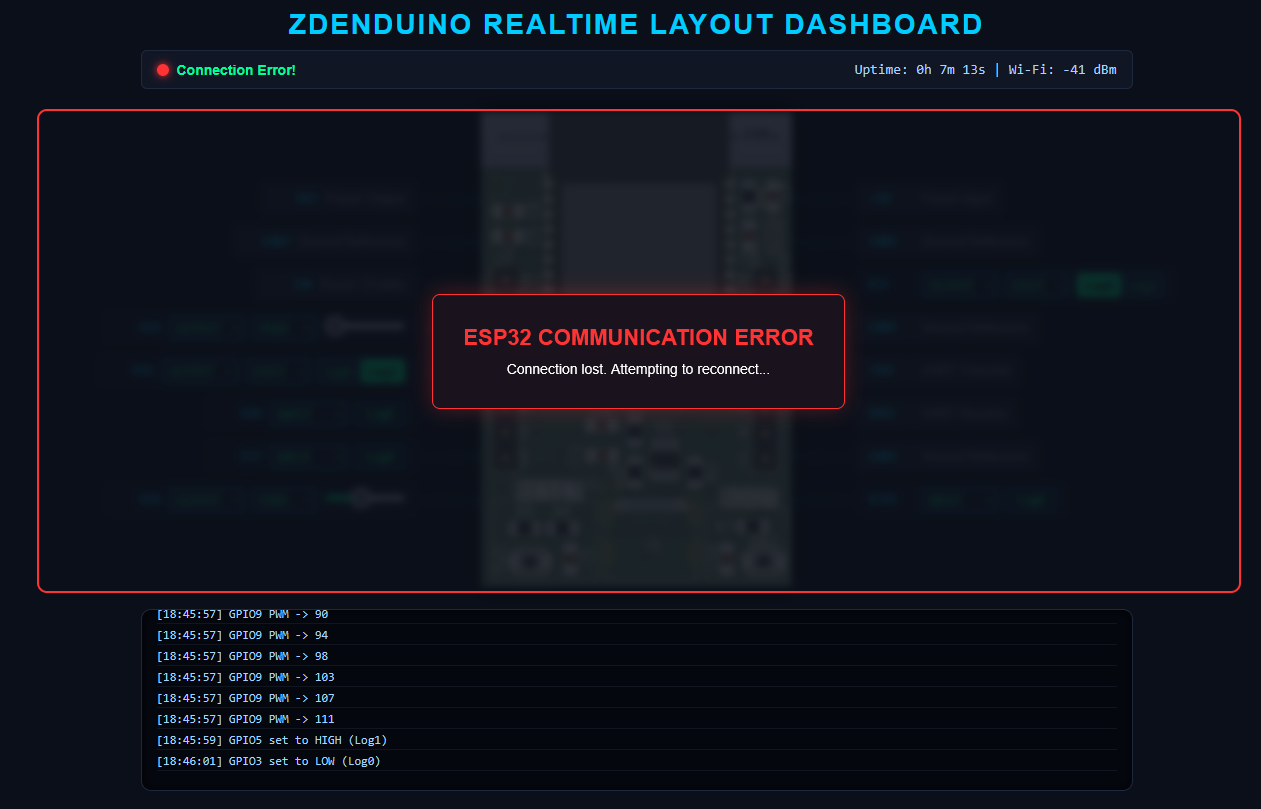
Not just the graphical interface was upgraded, a robust WebSocket heartbeat mechanism is now present to actively check whether the machine is still connected. If the connection drops for whatever reason, a blurred connection-error modal immediately overlays the entire view.
1
2
3
4
5
6
7
8
9
10
11
12
13
14
15
16
17
18
19
20
21
22
23
24
25
26
27
28
29
30
31
32
33
34
35
36
37
38
39
40
41
42
43
44
45
46
47
48
49
50
51
52
53
54
55
56
57
58
59
// ============================================================================
// WEBSOCKET HEARTBEAT (PING/PONG) & ERROR HANDLING MECHANISM
// ============================================================================

// Global pointers to manage background timer routines
let pingInterval;      // Periodically sends "ping" payloads to check if ESP32 is alive
let reconnectTimeout;  // Schedules an automatic retry lock if the connection drops

function connect() {
  log(`Connecting to ws://${ESP32_IP}:81...`);
  ws = new WebSocket(`ws://${ESP32_IP}:81`);

  // Triggered immediately when the WebSocket successfully opens
  ws.onopen = () => {
    log("Connected to hardware backend.");

    // 1. CLEAR RECONNECT LOOPS: Stop any pending reconnection attempts
    clearTimeout(reconnectTimeout);

    // 2. DISMISS ERROR MODAL: Hide the blurred error overlay from the screen
    document.getElementById("error-overlay").style.display = "none";
    document.getElementById("status-dot").className = "status-dot connected";
    document.getElementById("status-text").textContent = "Online";

    // 3. START HEARTBEAT: Send a lightweight "ping" every 5000ms (5 seconds).
    // If the hardware turns off or disconnects, the socket will timeout or throw an error.
    pingInterval = setInterval(() => {
      if (ws.readyState === WebSocket.OPEN) {
        ws.send(JSON.stringify({ type: 'ping' }));
      }
    }, 5000);
  };

  // Triggered when the link drops or the heartbeat fails to receive an echo
  ws.onclose = () => {
    handleDisconnect();
  };

  // Catch-all route to gracefully catch network crashes and force a safe closure
  ws.onerror = (err) => {
    ws.close();
  };
}

function handleDisconnect() {
  // 1. KILL ALIVE TIMERS: Stop trying to ping a broken socket channel
  clearInterval(pingInterval);

  // 2. TRIGGER ERROR MODAL: Instantly show the blurred error overlay component
  // to prevent any user interactions while the hardware link is dead.
  document.getElementById("error-overlay").style.display = "flex";
  document.getElementById("status-dot").className = "status-dot";
  document.getElementById("status-text").textContent = "Connection Error!";

  // 3. AUTO-RECONNECT ROUTINE: Clear pending queues and block a new connection
  // attempt for 3000ms (3 seconds) to prevent hammering the network link.
  clearTimeout(reconnectTimeout);
  reconnectTimeout = setTimeout(connect, 3000);
}
Initial state sync routine
More importantly, I implemented a proper initial state sync routine. On boot, all pins are automatically mapped into a deterministic, safe INPUT state to protect whatever components might be tied to the rails. The second a new device logs onto the dashboard via WebSockets, the frontend fires a “requestSync” handshake payload. The ESP32 immediately dumps its active state matrices—including real-time pin orientations, high/low voltage data, and raw system uptime metrics—and forces the dynamic UI elements to catch up immediately.
Frontend:
1
2
3
4
5
6
7
8
9
10
11
12
13
14
15
16
17
18
19
20
21
22
23
// ============================================================================
// FRONTEND: INITIAL HANDSHAKE REQUEST (JavaScript)
// ============================================================================

ws.onopen = () => {
  log("Connected to hardware backend.");

  // Dismiss error overlays and update status indicators
  document.getElementById("error-overlay").style.display = "none";
  document.getElementById("status-dot").className = "status-dot connected";

  // 1. STATE SYNC HANDSHAKE: The very second the WebSocket connection is established,
  // we fire a "requestSync" action payload to the ESP32. We don't guess the pin states;
  // we demand the absolute ground truth from the hardware right away.
  send({ type: 'requestSync' });

  // Start the regular heartbeat loop afterwards
  pingInterval = setInterval(() => {
    if(ws.readyState === WebSocket.OPEN) {
      send({ type: 'ping' });
    }
  }, 5000);
};
Backend:
1
2
3
4
5
6
7
8
9
10
11
12
13
14
15
16
17
18
19
20
21
22
23
24
25
26
27
28
29
30
31
32
33
34
35
36
37
38
39
40
41
42
43
44
45
46
47
48
// ============================================================================
// BACKEND: DETERMINISTIC SETUP & MATRIX DUMP (C++ / PlatformIO)
// ============================================================================

// Global matrix to keep track of the dynamic runtime state of each pin
struct GpioState {
  String mode = "input"; // Default fallback state
};
GpioState gpioStates[12]; // Indexed directly by hardware GPIO numbers

void setup() {
  Serial.begin(115200);

  // 1. HARDWARE PROTECTION LAYER: On boot, explicitly force every configured
  // pin into a safe, high-impedance INPUT state. This prevents accidental short
  // circuits or frying components attached to the rails before the code fully starts.
  for(auto &g : gpioList) {
    pinMode(g.pin, INPUT);
    gpioStates[g.pin].mode = "input"; // Keep internal software matrix synchronized
  }

  // Initialize Wi-Fi and WebSockets server downstream...
}

// 2. LIVE STATE DUMP: Triggered whenever a client connects or requests data
void sendTelemetry() {
  JsonDocument doc;

  // Pack core system metadata metrics
  doc["type"] = "telemetry";
  doc["uptime"] = millis() / 1000; // Raw uptime converted to seconds
  doc["rssi"] = WiFi.RSSI();        // Current Wi-Fi signal strength in dBm

  // Create explicit nested JSON objects to hold the pin status matrices
  JsonObject pins = doc["pins"].to<JsonObject>();
  JsonObject modes = doc["modes"].to<JsonObject>();

  // Extract and dump active hardware configuration parameters
  for(auto &g : gpioList) {
    pins[String(g.pin)] = digitalRead(g.pin);       // Real-time high/low voltage data (1/0)
    modes[String(g.pin)] = gpioStates[g.pin].mode;  // Active pin direction layout (input/output/pwm)
  }

  // Serialize the data structure into a single string and blast it across WebSockets
  String output;
  serializeJson(doc, output);
  notifyClients(output); // Dynamic UI elements on the frontend will catch up immediately
}
With this, I am much more satisfied with both the look and function. On top of this, I can finally move on to the final “graduation” project of the Zdenduino validation cycle!