Zdenduino - PIR Sensor, Deepsleep and Websocket - Part 5
Where Part 4 Left Off
In Part 4, Zdenduino went through another useful shakedown round: PWM fade, ADC reading, BLE scanning, and BLE LED control.
That was a nice mix of analog-ish behavior, wireless experiments, and the classic “can this pin do what I think it can do?” testing.
Now I want to move a little closer to the kind of hardware this board may actually talk to in real projects: simple external modules and sensors.
Nothing too fancy yet. Just small, focused tests that answer one question at a time:
Can Zdenduino read real-world modules reliably?
The Plan
- Test 1: PIR motion detector integration
- Test 2: PIR web dashboard with API fetch
- Test 3: Deep Sleep power management (Timer & GPIO wakeup)
- Test 4: Realtime Web Dashboard using WebSockets and JSON (ESP32 v3.0 API)
Test 1: PIR Detector
The first sensor test is the classic HC-SR501 PIR motion detector.
This module is simple, cheap, and useful. It watches for movement using passive infrared detection and exposes the result as a digital output. For a basic bring-up test, that is perfect: one signal wire, one GPIO pin, and Serial Monitor as the truth machine.
For this test I connected the PIR output to GPIO4:
1
2
3
PIR OUT -> GPIO4
PIR VCC -> 5V / suitable supply
PIR GND -> GND
The goal is simple:
- wait for the PIR sensor to stabilize,
- read its digital output,
- detect when motion starts,
- detect when motion ends,
- confirm that Zdenduino sees clean GPIO transitions.
1
2
3
4
5
6
7
8
9
10
11
12
13
14
15
16
17
18
19
20
21
22
23
24
25
26
27
28
29
30
31
32
33
34
35
36
37
38
39
40
41
42
43
44
45
46
47
48
49
50
51
//
// HC-SR501 PIR test for ESP32-C3 / Zdenduino
//
// PIR OUT -> GPIO4
//

const int pirPin = 4;

bool lastState = LOW;

void setup() {

  Serial.begin(115200);

  pinMode(pirPin, INPUT);

  Serial.println();
  Serial.println("================================");
  Serial.println("HC-SR501 PIR TEST");
  Serial.println("ESP32-C3 / Zdenduino");
  Serial.println("================================");
  Serial.println();
  Serial.println("PIR warming up...");

  // PIR senzoru chvíli trvá stabilizace
  delay(30000);

  Serial.println("Ready.");
  Serial.println();
}

void loop() {

  bool currentState = digitalRead(pirPin);

  // Detekce náběžné hrany
  if (currentState == HIGH && lastState == LOW) {

    Serial.println(">>> Motion detected!");
  }

  // Detekce sestupné hrany
  if (currentState == LOW && lastState == HIGH) {

    Serial.println("<<< Motion ended.");
  }

  lastState = currentState;

  delay(50);
}
The 30 second delay at startup is not a bug. PIR modules usually need a short warm-up period before the output becomes trustworthy. It feels slightly dramatic to wait half a minute for a motion sensor, but that is just the little analog world inside the module settling down.
And here is the Serial Monitor output:
1
2
3
4
5
6
7
8
9
10
11
12
13
================================
HC-SR501 PIR TEST
ESP32-C3 / Zdenduino
================================

PIR warming up...
Ready.

>>> Motion detected!
<<< Motion ended.
>>> Motion detected!
<<< Motion ended.
>>> Motion detected!
That is exactly what I wanted to see. The board reads the PIR output correctly, and the sketch only prints when the signal changes state instead of spamming the same value forever.
Small test, useful result.
Test 2: PIR Dashboard and API Fetch
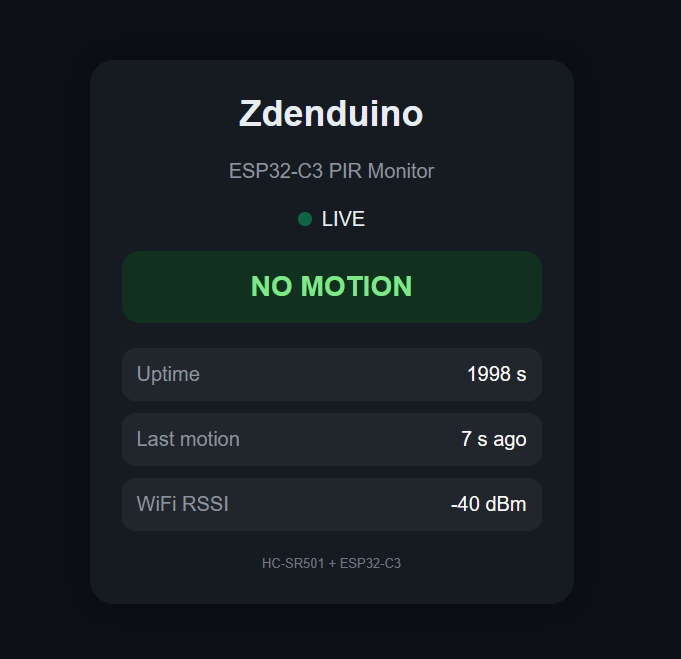
Serial Monitor is great for bring-up, but the ESP32-C3 has Wi-Fi, so keeping the PIR result trapped inside a USB terminal feels a little wasteful.
The next step is to turn the same PIR test into a tiny web dashboard.
This is technically two things at once:
- Zdenduino runs a small HTTP server.
- The browser page uses JavaScript
fetch()to call a tiny/statusAPI endpoint.
The actual API endpoint is created here:
1
server.on("/status", handleStatus);
Whenever the browser requests /status, the ESP32 calls handleStatus() and generates a JSON response:
1
2
3
4
5
6
7
8
9
10
11
void handleStatus()
  { String json = "{";
    json += "\"state\":\"" + state + "\",";
    json += "\"uptime\":" + String(uptimeSec) + ",";
    json += "\"last_motion\":\"" + lastMotion + "\",";
    json += "\"rssi\":" + String(WiFi.RSSI());

    json += "}";

    server.send(200, "application/json", json);
  }
So the board serves the page, the page asks the board for fresh JSON data every 500 ms, and the UI changes color depending on whether the PIR is warming up, idle, or detecting motion.
That makes this test a nice bridge between the sensor world and the network world. GPIO still does the actual sensing, but the result is now visible from any device on the same Wi-Fi network.
Full PIR dashboard sketch
1
2
3
4
5
6
7
8
9
10
11
12
13
14
15
16
17
18
19
20
21
22
23
24
25
26
27
28
29
30
31
32
33
34
35
36
37
38
39
40
41
42
43
44
45
46
47
48
49
50
51
52
53
54
55
56
57
58
59
60
61
62
63
64
65
66
67
68
69
70
71
72
73
74
75
76
77
78
79
80
81
82
83
84
85
86
87
88
89
90
91
92
93
94
95
96
97
98
99
100
101
102
103
104
105
106
107
108
109
110
111
112
113
114
115
116
117
118
119
120
121
122
123
124
125
126
127
128
129
130
131
132
133
134
135
136
137
138
139
140
141
142
143
144
145
146
147
148
149
150
151
152
153
154
155
156
157
158
159
160
161
162
163
164
165
166
167
168
169
170
171
172
173
174
175
176
177
178
179
180
181
182
183
184
185
186
187
188
189
190
191
192
193
194
195
196
197
198
199
200
201
202
203
204
205
206
207
208
209
210
211
212
213
214
215
216
217
218
219
220
221
222
223
224
225
226
227
228
229
230
231
232
233
234
235
236
237
238
239
240
241
242
243
244
245
246
247
248
249
250
251
252
253
254
255
256
257
258
259
260
261
262
263
264
265
266
267
268
269
270
271
272
273
274
275
276
277
278
279
280
281
282
283
284
285
286
287
288
289
290
291
292
293
294
295
296
297
298
299
300
301
302
303
304
305
306
307
308
309
310
311
312
313
314
315
316
317
318
319
320
321
322
323
324
325
326
327
328
329
330
331
332
333
334
335
336
337
338
339
340
341
342
343
344
345
346
347
348
349
350
351
352
353
354
355
356
357
358
359
360
361
362
363
364
365
366
367
368
369
370
371
372
373
374
375
376
377
378
379
380
381
382
383
384
385
386
387
388
389
390
391
392
393
394
395
396
397
398
399
400
401
402
403
404
405
406
407
408
409
410
411
412
413
414
415
416
417
418
419
420
421
422
423
424
425
426
427
428
429
430
431
432
433
434
435
436
437
438
439
440
441
442
443
444
445
#include <WiFi.h>
#include <WebServer.h>

//
// ======================
// WIFI
// ======================
//
const char* ssid = "TVOJE_WIFI";
const char* password = "TVOJE_HESLO";

//
// ======================
// PIR
// ======================
//
const int pirPin = 4;

//
// ======================
// WEB SERVER
// ======================
//
WebServer server(80);

//
// ======================
// STATES
// ======================
//
bool motionDetected = false;
bool pirReady = false;

unsigned long bootTime = 0;
unsigned long lastMotionTime = 0;

//
// ======================
// HTML PAGE
// ======================
//
const char webpage[] PROGMEM = R"rawliteral(

<!DOCTYPE html>
<html lang="en">

<head>

<meta charset="utf-8">
<meta name="viewport" content="width=device-width, initial-scale=1">

<title>Zdenduino PIR Monitor</title>

<style>

body {
  margin: 0;
  padding: 0;
  background: #0d1117;
  color: #e6edf3;
  font-family: Arial, sans-serif;

  display: flex;
  justify-content: center;
  align-items: center;

  height: 100vh;
}

.card {
  width: 420px;

  background: #161b22;

  border-radius: 24px;

  padding: 32px;

  box-shadow:
    0 0 40px rgba(0,0,0,0.5);

  text-align: center;
}

h1 {
  margin-top: 0;
  font-size: 36px;
}

.subtitle {
  color: #8b949e;
  margin-bottom: 25px;
}

.status {

  padding: 20px;

  border-radius: 18px;

  font-size: 28px;
  font-weight: bold;

  margin-top: 15px;
  margin-bottom: 25px;

  transition: all 0.3s ease;
}

.warmup {
  background: #5b4a14;
  color: #ffd866;
}

.idle {
  background: #12301f;
  color: #7ee787;
}

.motion {
  background: #4a1d1d;
  color: #ff7b72;
}

.live {
  display: flex;
  justify-content: center;
  align-items: center;

  gap: 10px;

  margin-bottom: 20px;
}

.dot {
  width: 14px;
  height: 14px;

  border-radius: 50%;

  background: #00ff88;

  animation: pulse 1s infinite;
}

@keyframes pulse {

  0%   { opacity: 0.3; transform: scale(1.0); }
  50%  { opacity: 1.0; transform: scale(1.3); }
  100% { opacity: 0.3; transform: scale(1.0); }
}

.info {

  background: #21262d;

  border-radius: 14px;

  padding: 15px;

  margin-top: 12px;

  text-align: left;
}

.label {
  color: #8b949e;
}

.value {
  float: right;
  color: #ffffff;
}

.footer {

  margin-top: 25px;

  color: #6e7681;

  font-size: 13px;
}

</style>

</head>

<body>

<div class="card">

  <h1>Zdenduino</h1>

  <div class="subtitle">
    ESP32-C3 PIR Monitor
  </div>

  <div class="live">
    <div class="dot"></div>
    <div>LIVE</div>
  </div>

  <div id="statusBox" class="status warmup">
    WARMING UP
  </div>

  <div class="info">
    <span class="label">Uptime</span>
    <span id="uptime" class="value">0 s</span>
  </div>

  <div class="info">
    <span class="label">Last motion</span>
    <span id="lastMotion" class="value">never</span>
  </div>

  <div class="info">
    <span class="label">WiFi RSSI</span>
    <span id="rssi" class="value">0 dBm</span>
  </div>

  <div class="footer">
    HC-SR501 + ESP32-C3
  </div>

</div>

<script>

async function updateStatus() {

  try {

    const response = await fetch('/status');

    const data = await response.json();

    const statusBox = document.getElementById('statusBox');

    statusBox.className = 'status';

    if (data.state === 'warmup') {

      statusBox.classList.add('warmup');
      statusBox.innerText = 'WARMING UP';

    } else if (data.state === 'motion') {

      statusBox.classList.add('motion');
      statusBox.innerText = 'MOTION DETECTED';

    } else {

      statusBox.classList.add('idle');
      statusBox.innerText = 'NO MOTION';
    }

    document.getElementById('uptime').innerText =
      data.uptime + ' s';

    document.getElementById('lastMotion').innerText =
      data.last_motion;

    document.getElementById('rssi').innerText =
      data.rssi + ' dBm';

  } catch (err) {

    console.log(err);
  }
}

setInterval(updateStatus, 500);

updateStatus();

</script>

</body>
</html>

)rawliteral";

//
// ======================
// WEB HANDLERS
// ======================
//
void handleRoot()
{
  server.send(200, "text/html", webpage);
}

void handleStatus()
{
  String state;

  if (!pirReady) {
    state = "warmup";
  }
  else if (motionDetected) {
    state = "motion";
  }
  else {
    state = "idle";
  }

  unsigned long uptimeSec =
    (millis() - bootTime) / 1000;

  String lastMotion;

  if (lastMotionTime == 0) {

    lastMotion = "never";

  } else {

    unsigned long ago =
      (millis() - lastMotionTime) / 1000;

    lastMotion =
      String(ago) + " s ago";
  }

  String json = "{";

  json += "\"state\":\"" + state + "\",";
  json += "\"uptime\":" + String(uptimeSec) + ",";
  json += "\"last_motion\":\"" + lastMotion + "\",";
  json += "\"rssi\":" + String(WiFi.RSSI());

  json += "}";

  server.send(200, "application/json", json);
}

//
// ======================
// SETUP
// ======================
//
void setup()
{
  Serial.begin(115200);

  pinMode(pirPin, INPUT);

  bootTime = millis();

  Serial.println();
  Serial.println("================================");
  Serial.println("Zdenduino PIR Dashboard");
  Serial.println("================================");

  //
  // WIFI
  //
  WiFi.mode(WIFI_STA);

  WiFi.begin(ssid, password);

  Serial.print("Connecting");

  while (WiFi.status() != WL_CONNECTED) {

    delay(500);
    Serial.print(".");
  }

  Serial.println();
  Serial.println("WiFi connected!");

  Serial.print("IP address: ");
  Serial.println(WiFi.localIP());

  //
  // WEB SERVER
  //
  server.on("/", handleRoot);

  server.on("/status", handleStatus);

  server.begin();

  Serial.println("HTTP server started.");

  //
  // NON-BLOCKING PIR WARMUP
  //
  Serial.println("PIR warming up...");
}

//
// ======================
// LOOP
// ======================
//
void loop()
{
  //
  // PIR READY AFTER 30s
  //
  if (!pirReady && millis() > 30000) {

    pirReady = true;

    Serial.println("PIR ready.");
  }

  //
  // READ PIR
  //
  bool currentState = digitalRead(pirPin);

  static bool lastState = LOW;

  if (pirReady) {

    if (currentState == HIGH && lastState == LOW) {

      motionDetected = true;

      lastMotionTime = millis();

      Serial.println(">>> Motion detected!");
    }

    if (currentState == LOW && lastState == HIGH) {

      motionDetected = false;

      Serial.println("<<< Motion ended.");
    }
  }

  lastState = currentState;

  //
  // HANDLE WEB
  //
  server.handleClient();

  delay(10);
}
The important little upgrade here is that the PIR warm-up is non-blocking. In the first sketch, delay(30000) completely stopped everything for half a minute. That was fine for a Serial Monitor test, but it would make the web server feel dead at startup.
Here the board starts Wi-Fi and the HTTP server immediately, while the dashboard shows WARMING UP until the 30 second mark passes. Much nicer.
The /status endpoint returns a tiny JSON object like this:
1
2
3
4
5
6
{
  "state": "motion",
  "uptime": 74,
  "last_motion": "2 s ago",
  "rssi": -48
}
And the browser keeps asking for it twice per second.
This is not a full smart-home device yet. But as a proof of concept, it is already a very useful pattern: sensor input on one side, tiny local API in the middle, live browser UI on the other side.
Test 3: Deep Sleep
One of the features I really wanted to test was Deep Sleep functionality. Low power modes are one of the biggest advantages of the ESP32 platform, especially for battery-powered IoT devices.
The first test was a very simple timer wakeup example:
- boot
- stay awake for 5 seconds
- go to deep sleep
- automatically wake up after 10 seconds
1
2
3
4
5
6
7
8
9
10
11
12
13
14
15
16
17
18
19
20
21
22
23
24
25
26
27
28
29
30
31
32
33
34
35
36
37
38
39
40
41
42
#include "esp_sleep.h"

RTC_DATA_ATTR int bootCount = 0;

void setup()
{
  Serial.begin(115200);

  delay(1000);

  bootCount++;

  Serial.println();
  Serial.println("================================");
  Serial.println("Zdenduino Deep Sleep Test");
  Serial.println("================================");

  Serial.print("Boot count: ");
  Serial.println(bootCount);

  Serial.println();
  Serial.println("Awake for 5 seconds...");

  delay(5000);

  Serial.println("Going to deep sleep...");
  Serial.println();

  //
  // Sleep for 10 seconds
  //
  esp_sleep_enable_timer_wakeup(10ULL * 1000000ULL);

  Serial.flush();

  esp_deep_sleep_start();
}

void loop()
{
  // never reached
}
And it worked perfectly:
1
2
3
4
5
6
7
================================
Zdenduino Deep Sleep Test
================================
Boot count: 9

Awake for 5 seconds...
Going to deep sleep...
After that, I wanted something a bit more practical.
I connected an HC-SR501 PIR motion sensor to GPIO4 and configured the ESP32-C3 to wake up whenever motion was detected.
The behavior was:
- boot
- print wakeup reason
- stay awake for 5 seconds
- enter deep sleep
- wake up again when motion is detected
1
2
3
4
5
6
7
8
9
10
11
12
13
14
15
16
17
18
19
20
21
22
23
24
25
26
27
28
29
30
31
32
33
34
35
36
37
38
39
40
41
42
43
44
45
46
47
48
49
50
51
52
53
54
55
56
57
58
59
60
61
62
63
64
65
66
67
68
69
70
71
72
73
74
75
76
77
78
79
80
81
82
83
84
85
86
87
88
89
90
//
// ======================================
// Zdenduino PIR Wakeup Deep Sleep Test
// ESP32-C3 + HC-SR501
//
// PIR OUT -> GPIO4
//
// ESP:
// - boots
// - prints wakeup reason
// - stays awake for 5 seconds
// - goes to sleep
// - PIR motion wakes it up
// ======================================
//

#include "esp_sleep.h"

const gpio_num_t pirPin = GPIO_NUM_4;

RTC_DATA_ATTR int bootCount = 0;

void printWakeupReason()
{
  esp_sleep_wakeup_cause_t wakeupReason =
    esp_sleep_get_wakeup_cause();

  switch (wakeupReason)
  {
    case ESP_SLEEP_WAKEUP_GPIO:
      Serial.println("Wakeup caused by PIR motion.");
      break;

    case ESP_SLEEP_WAKEUP_TIMER:
      Serial.println("Wakeup caused by timer.");
      break;

    default:
      Serial.println("Normal power-on boot.");
      break;
  }
}

void setup()
{
  Serial.begin(115200);

  delay(1000);

  bootCount++;

  pinMode(pirPin, INPUT);

  Serial.println();
  Serial.println("================================");
  Serial.println("Zdenduino PIR Deep Sleep Wakeup");
  Serial.println("================================");

  Serial.print("Boot count: ");
  Serial.println(bootCount);

  printWakeupReason();

  Serial.println();
  Serial.println("Awake for 5 seconds...");

  for (int i = 5; i > 0; i--)
  {
    Serial.printf("Sleeping in %d...\n", i);
    delay(1000);
  }

  Serial.println();
  Serial.println("Entering deep sleep.");
  Serial.println("Waiting for PIR motion...");

  esp_deep_sleep_enable_gpio_wakeup(
    BIT(pirPin),
    ESP_GPIO_WAKEUP_GPIO_HIGH
  );

  Serial.flush();

  esp_deep_sleep_start();
}

void loop()
{
  // never reached
}
Serial output:
1
2
3
4
5
6
7
8
9
10
11
12
13
14
15
================================
Zdenduino PIR Deep Sleep Wakeup
================================
Boot count: 6
Wakeup caused by PIR motion.

Awake for 5 seconds...
Sleeping in 5...
Sleeping in 4...
Sleeping in 3...
Sleeping in 2...
Sleeping in 1...

Entering deep sleep.
Waiting for PIR motion...
Honestly, seeing my own custom PCB wake up from a PIR interrupt felt ridiculously satisfying.
Test 4: Realtime WebSocket GPIO Dashboard
After validating GPIOs, PWM and Deep Sleep functionality, I wanted to push the board into something that actually felt like a real IoT platform.
So naturally, the next step was:
A realtime WebSocket-based GPIO control dashboard.
And honestly?
This turned out to be one of the coolest tests so far.
The Goal
The idea was simple:
- ESP32-C3 hosts a web server
- Browser connects through WebSockets
- GPIO states update in realtime
GPIOs can be switched between:
- INPUT
- OUTPUT
- PWM
- PWM capable pins get a brightness slider
- Live debug messages appear directly in the browser
No page refreshes. No polling. Everything updates instantly.
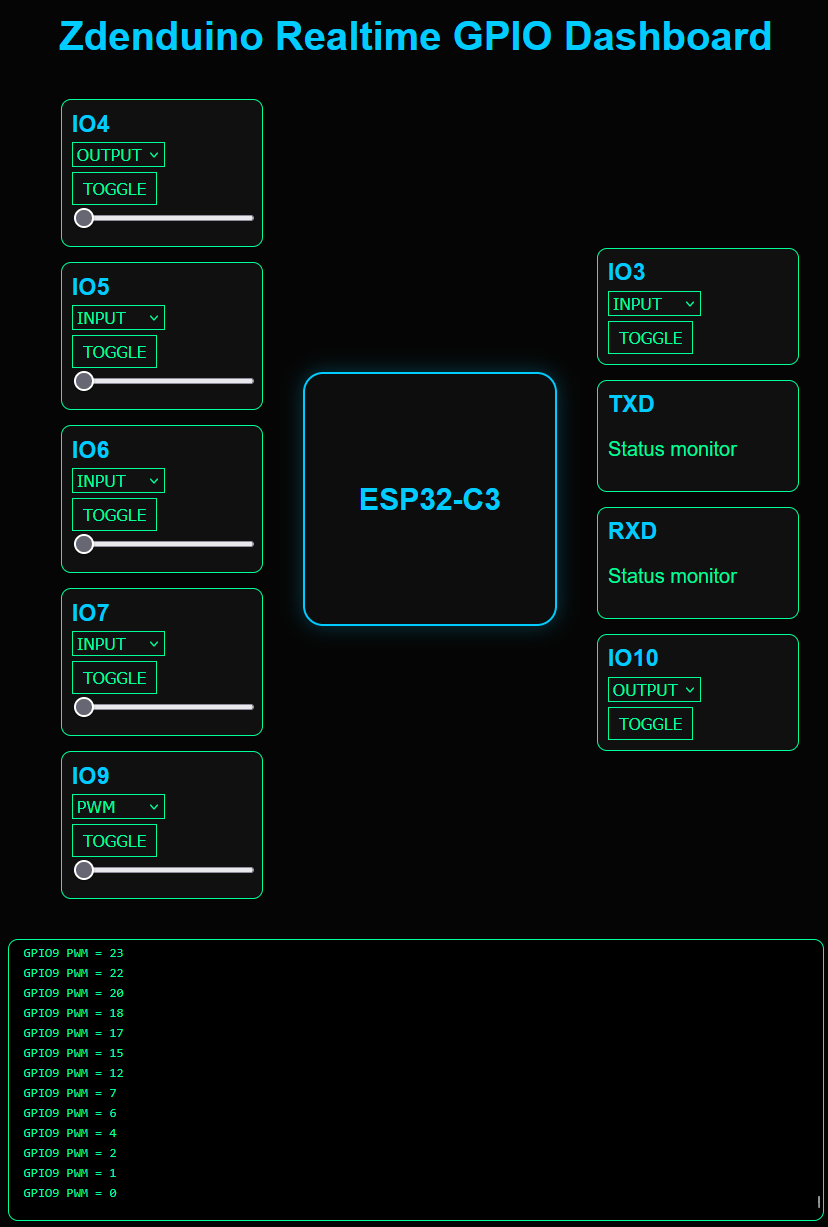
The Dashboard Layout
The GUI was designed to resemble the physical Zdenduino board.
- Dark mode theme
- Black background
- Green + blue accents
- ESP32-C3 block in the center
- GPIOs placed around the chip similarly to the real PCB
Left side:
- IO9
- IO7
- IO6
- IO5
- IO4
Right side:
- IO10
- RXD
- TXD
- IO3
RXD/TXD are displayed as activity indicators.
Under the board layout sits a live debug console receiving realtime messages from the ESP32.
Perfect for debugging. Perfect for demos. And honestly… perfect for dopamine.
The Result
The ESP32-C3 successfully:
- hosted the web interface
- handled websocket communication
- updated GPIO states in realtime
- controlled PWM outputs smoothly
- streamed live debug logs to the browser
And seeing my own custom PCB being controlled from a browser in realtime was an incredibly satisfying moment.
Video Demo
The video above shows realtime PWM brightness control over WebSockets.
No delays. No refreshes. Just smooth realtime communication between the browser and the ESP32-C3.
WebSocket GPIO Dashboard Code
Show Full ESP32 WebSocket Dashboard Source Code
1
2
3
4
5
6
7
8
9
10
11
12
13
14
15
16
17
18
19
20
21
22
23
24
25
26
27
28
29
30
31
32
33
34
35
36
37
38
39
40
41
42
43
44
45
46
47
48
49
50
51
52
53
54
55
56
57
58
59
60
61
62
63
64
65
66
67
68
69
70
71
72
73
74
75
76
77
78
79
80
81
82
83
84
85
86
87
88
89
90
91
92
93
94
95
96
97
98
99
100
101
102
103
104
105
106
107
108
109
110
111
112
113
114
115
116
117
118
119
120
121
122
123
124
125
126
127
128
129
130
131
132
133
134
135
136
137
138
139
140
141
142
143
144
145
146
147
148
149
150
151
152
153
154
155
156
157
158
159
160
161
162
163
164
165
166
167
168
169
170
171
172
173
174
175
176
177
178
179
180
181
182
183
184
185
186
187
188
189
190
191
192
193
194
195
196
197
198
199
200
201
202
203
204
205
206
207
208
209
210
211
212
213
214
215
216
217
218
219
220
221
222
223
#include <WiFi.h>
#include <WebServer.h>
#include <WebSocketsServer.h> // Library by Markus Sattler (Links2004)
#include <ArduinoJson.h>

const char* ssid = "YOUR_WIFI";
const char* password = "YOUR_PASSWORD";

WebServer server(80);
WebSocketsServer webSocket = WebSocketsServer(81); // WebSockets will run on port 81

struct GpioConfig
{
  int pin;
  bool pwm;
  bool output;
  int pwmValue;
};

GpioConfig gpioList[] = {
  {4, true, true, 0},
  {5, true, true, 0},
  {6, true, true, 0},
  {7, true, true, 0},
  {9, true, true, 0},
  {10, false, true, 0},
  {3, false, true, 0}
};

const char index_html[] PROGMEM = R"rawliteral(
<!DOCTYPE html>
<html>
<head>
<meta charset="UTF-8">
<meta name="viewport" content="width=device-width, initial-scale=1.0">
<title>Zdenduino Dashboard</title>
<style>
body { margin: 0; background: #050505; color: #00ff99; font-family: Arial, sans-serif; }
h1 { text-align: center; margin-top: 20px; color: #00ccff; }
.board { width: 900px; margin: auto; margin-top: 40px; display: flex; justify-content: center; align-items: center; gap: 40px; }
.gpio-column { display: flex; flex-direction: column-reverse; gap: 15px; }
.gpio { background: #101010; border: 1px solid #00ff99; border-radius: 10px; padding: 10px; width: 180px; }
.gpio h3 { margin: 0; color: #00ccff; }
button { background: #111; border: 1px solid #00ff99; color: #00ff99; padding: 5px 10px; margin-top: 5px; cursor: pointer; }
button:hover { background: #003322; }
select { background: #111; color: #00ff99; border: 1px solid #00ff99; margin-top: 5px; }
input[type=range] { width: 100%; }
.chip { width: 250px; height: 250px; border: 2px solid #00ccff; border-radius: 20px; display: flex; justify-content: center; align-items: center; background: #0d0d0d; box-shadow: 0 0 20px #00ccff44; }
.chip h2 { color: #00ccff; text-align: center; }
.console { width: 90%; margin: auto; margin-top: 40px; background: #000; border: 1px solid #00ff99; border-radius: 10px; padding: 15px; height: 250px; overflow-y: auto; font-family: monospace; }
.log { color: #00ff99; margin-bottom: 5px; }
</style>
</head>
<body>
<h1>Zdenduino Realtime GPIO Dashboard</h1>
<div class="board">
<div class="gpio-column" id="left-column"></div>
<div class="chip"><h2>ESP32-C3</h2></div>
<div class="gpio-column" id="right-column"></div>
</div>
<div class="console" id="console"></div>
<script>
// WebSocket connects directly to port 81
const ws = new WebSocket(`ws://${location.hostname}:81`);

const leftPins = [9,7,6,5,4];
const rightPins = [10,'RXD','TXD',3];

function createGPIO(pin, pwm=true) {
  const div = document.createElement('div');
  div.className = 'gpio';
  div.innerHTML = `
    <h3>IO${pin}</h3>
    <select onchange="changeMode(${pin}, this.value)">
      <option value="input">INPUT</option>
      <option value="output">OUTPUT</option>
      ${pwm ? '<option value="pwm">PWM</option>' : ''}
    </select>
    <br>
    <button onclick="togglePin(${pin})">TOGGLE</button>
    ${pwm ? `<br><input type="range" min="0" max="255" value="0" oninput="setPWM(${pin}, this.value)">` : ''}
  `;
  return div;
}

leftPins.forEach(pin => { document.getElementById('left-column').appendChild(createGPIO(pin)); });
rightPins.forEach(pin => {
  if(pin === 'RXD' || pin === 'TXD') {
    const div = document.createElement('div');
    div.className = 'gpio';
    div.innerHTML = `<h3>${pin}</h3><p>Status monitor</p>`;
    document.getElementById('right-column').appendChild(div);
  } else {
    document.getElementById('right-column').appendChild(createGPIO(pin, false));
  }
});

function send(data) { ws.send(JSON.stringify(data)); }
function togglePin(pin) { send({type:'toggle', pin:pin}); }
function setPWM(pin, value) { send({type:'pwm', pin:pin, value:parseInt(value)}); }
function changeMode(pin, mode) { send({type:'mode', pin:pin, mode:mode}); }

function log(text) {
  const div = document.createElement('div');
  div.className = 'log';
  div.textContent = text;
  const consoleDiv = document.getElementById('console');
  consoleDiv.appendChild(div);
  consoleDiv.scrollTop = consoleDiv.scrollHeight;
}
ws.onmessage = (event) => { log(event.data); };
</script>
</body>
</html>
)rawliteral";

void notifyClients(String message)
{
  webSocket.broadcastTXT(message);
}

void handleWebSocketMessage(uint8_t *payload, size_t length)
{
  JsonDocument doc;
  DeserializationError error = deserializeJson(doc, payload, length);

  if (error) return;

  String type = doc["type"];
  int pin = doc["pin"];

  if(type == "toggle")
  {
    digitalWrite(pin, !digitalRead(pin));
    notifyClients("GPIO" + String(pin) + " toggled to " + String(digitalRead(pin)));
  }

  if(type == "pwm")
  {
    int value = doc["value"];
    ledcWrite(pin, value); // ESP32 v3.0 API: writing directly to the pin
    notifyClients("GPIO" + String(pin) + " PWM = " + String(value));
  }

  if(type == "mode")
  {
    String mode = doc["mode"];

    if(mode == "input")
    {
      ledcDetach(pin);
      pinMode(pin, INPUT);
    }
    else if(mode == "output")
    {
      ledcDetach(pin);
      pinMode(pin, OUTPUT);
    }
    else if(mode == "pwm")
    {
      ledcAttach(pin, 5000, 8); // ESP32 v3.0 API: automatic PWM channel allocation
    }

    notifyClients("GPIO" + String(pin) + " mode -> " + mode);
  }
}

// Callback function to handle WebSocket events
void webSocketEvent(uint8_t num, WStype_t type, uint8_t * payload, size_t length) {
  switch(type) {
    case WStype_DISCONNECTED:
      Serial.printf("[%u] Disconnected!\n", num);
      break;
    case WStype_CONNECTED:
      Serial.printf("[%u] Connected!\n", num);
      webSocket.sendTXT(num, "Client connected.");
      break;
    case WStype_TEXT:
      handleWebSocketMessage(payload, length);
      break;
    default:
      break;
  }
}

void setup()
{
  Serial.begin(115200);

  for(auto &g : gpioList)
  {
    pinMode(g.pin, OUTPUT);
    digitalWrite(g.pin, LOW);
  }

  WiFi.begin(ssid, password);
  Serial.print("Connecting to WiFi");
  while(WiFi.status() != WL_CONNECTED)
  {
    delay(500);
    Serial.print(".");
  }
  Serial.println("\nConnected.");
  Serial.println(WiFi.localIP());

  // Start the WebSocket server on port 81
  webSocket.begin();
  webSocket.onEvent(webSocketEvent);

  // Serve the main HTML page on port 80
  server.on("/", HTTP_GET, []() {
    server.send_P(200, "text/html", index_html);
  });

  server.begin();
  Serial.println("Server started.");
}

void loop()
{
  server.handleClient(); // Required for processing HTTP server requests
  webSocket.loop();      // Required for processing WebSocket data
}
Final Thoughts
I think I have done enough testing for now. There are still plenty of exciting ideas floating around for future experiments—like building a mini digital oscilloscope, exploring audio projects (such as a theremin), integrating light sensors, current meters, a pseudo-random noise generator, or even implementing a PID regulator. But for this phase of the project, the current tests have proven exactly what I needed.
What’s Next
At this point, Zdenduino is starting to feel less like a simple development board and more like a fully fledged, versatile IoT platform.
To officially “graduate” this stage of development, I am planning one big, final testing project. It will tie together everything I have built so far, plus a few extra features to push the hardware to its limits.
Once that final project is complete, I’ll have the confidence and real-world data needed to move on to the next big milestone: designing my first custom shield PCB tailored for industrial use.
Stay tuned! 🚀